Jobs and schedules
Every piece of work MiniPAM does in the background becomes a job: a scan, an import, a template generation, a clean-up. A job records who or what started it, its status, duration, related records, child jobs, the first error, and its log.
Open Discovery → Jobs. It needs the Discovery workspace feature; if you use templates without discovery, the same jobs are under Templates & checks → Jobs. Running agent jobs needs the editor role and a connected agent. Managing schedules needs the admin role.
Run a one-off agent job
Under Agent jobs, pick an agent and choose Run Agent Job. Then choose the Input Type:
- ping: an address, count, and maximum TTL.
- netinfo: nothing. Refreshes the agent's own network information. Import Networks on the result adds the networks the agent reported.
- netscan: a CIDR and interface. ARP, so only on a network the agent is attached to. Its findings go to the review queue.
- nmap enrichment: targets, which ports, service and OS detection, scripts, and a timeout. What the agent may do is limited by its own configuration.
Filter the job list with the search bar, for example status:eq:running.
Read a failed job
Select the job and read the first specific error, not the final summary. Then check the agent, the job's arguments, and its parent job. Logs stream live while a job runs and stay with the job afterwards.
Schedules
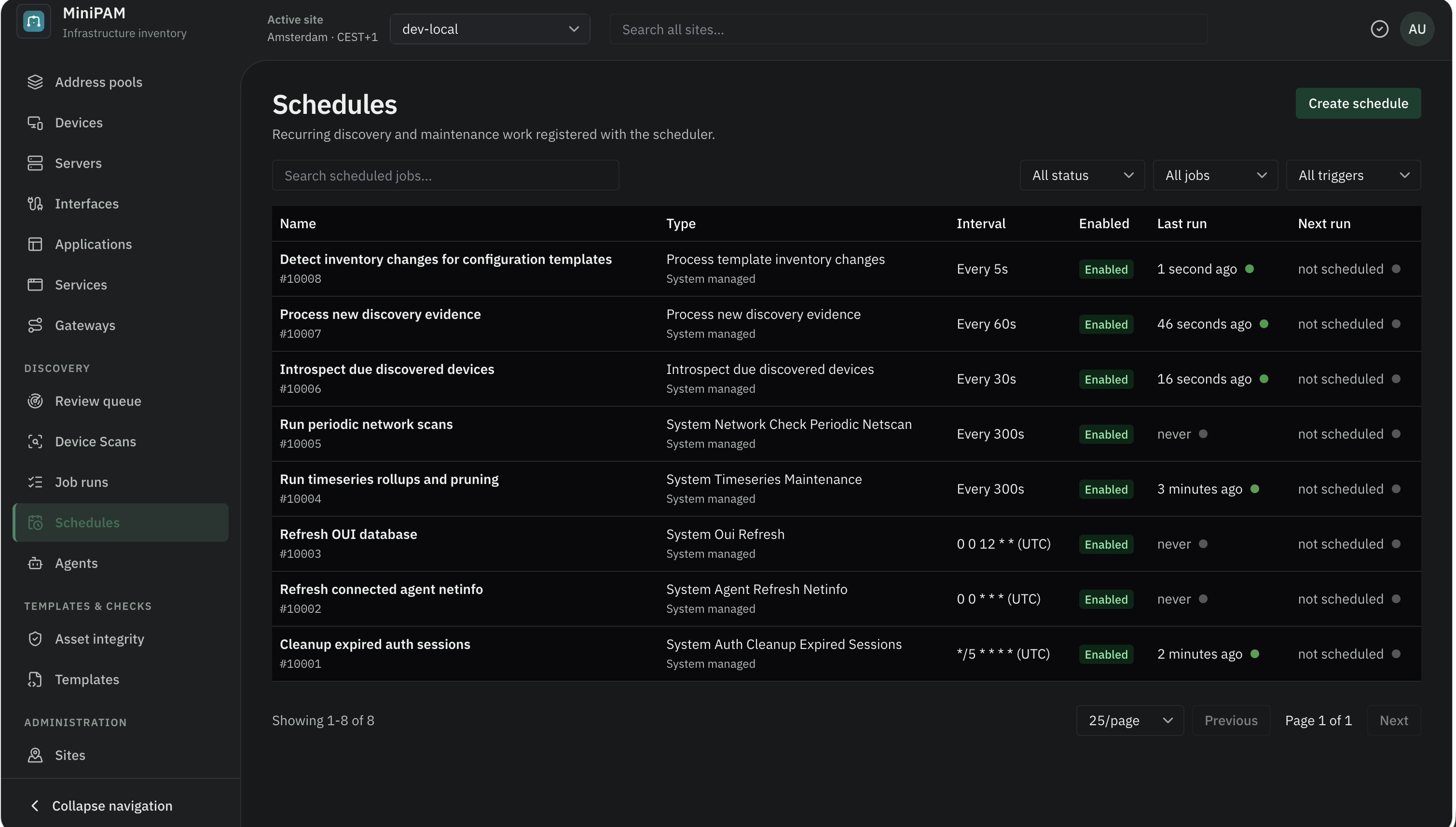
Under Schedules you see everything that runs on its own. Each schedule has a trigger (an interval in seconds, or a five-field cron expression with a time zone), a start time, and the arguments for its handler.
- Editors can Run Now.
- Admins can create, edit, pause, resume, and delete schedules.
- System schedules keep MiniPAM working: periodic scans, turning evidence into suggestions, template runs, clean-ups. You can pause or run them, but not delete them. The scheduler lists them.
If a schedule keeps failing, pause it first, then look at its last job before changing anything.
Periodic network scans
Under Schedules, choose Network scan settings (admins) to open Periodic Network Scans. When Enabled is ticked, every agent runs a netscan at a fixed Interval: every 5, 15, or 30 minutes, or every 1, 3, 8, or 24 hours. Tick Keep detailed scheduled logs only while troubleshooting, and set how many scan summary jobs to keep under Retained daily jobs (14 by default). Choose Save Settings.
Retained daily jobs is the same value as Retained periodic scan summaries in System tools and settings. Other old jobs are cleaned up according to the retention settings there.